Skip to content
The Console deskA section of a mixing desk with four channels. Channel 1 is Cue, showing booked hours. Channel 2 is Frame, showing a clip marked on a waveform. Channel 3 is Send, showing a delivery three files of four complete. The fourth is the Console master.CH 01CUE10:0018:00+10+50510203040∞CH 02FRAME+10+50510203040∞CH 03SEND3 OF 4 FILES+10+50510203040∞MASTERCONSOLELR+10+50510203040∞

Bookings,clips anddelivery onone desk.

Cue runs the studio Frame cuts the clips Send delivers the files

Local

For recording and production studios

A small studio runs ona dozen chores nobody is paid to do.Console does them.

Replaces: booking links mailing lists file transfer a spreadsheet half a receptionist

CH 01 Cue studio operations

A studio that runs without a front desk.

Cue takes the booking, opens the door, answers the message and chases the review. The hours you used to pay someone to cover now run on their own.

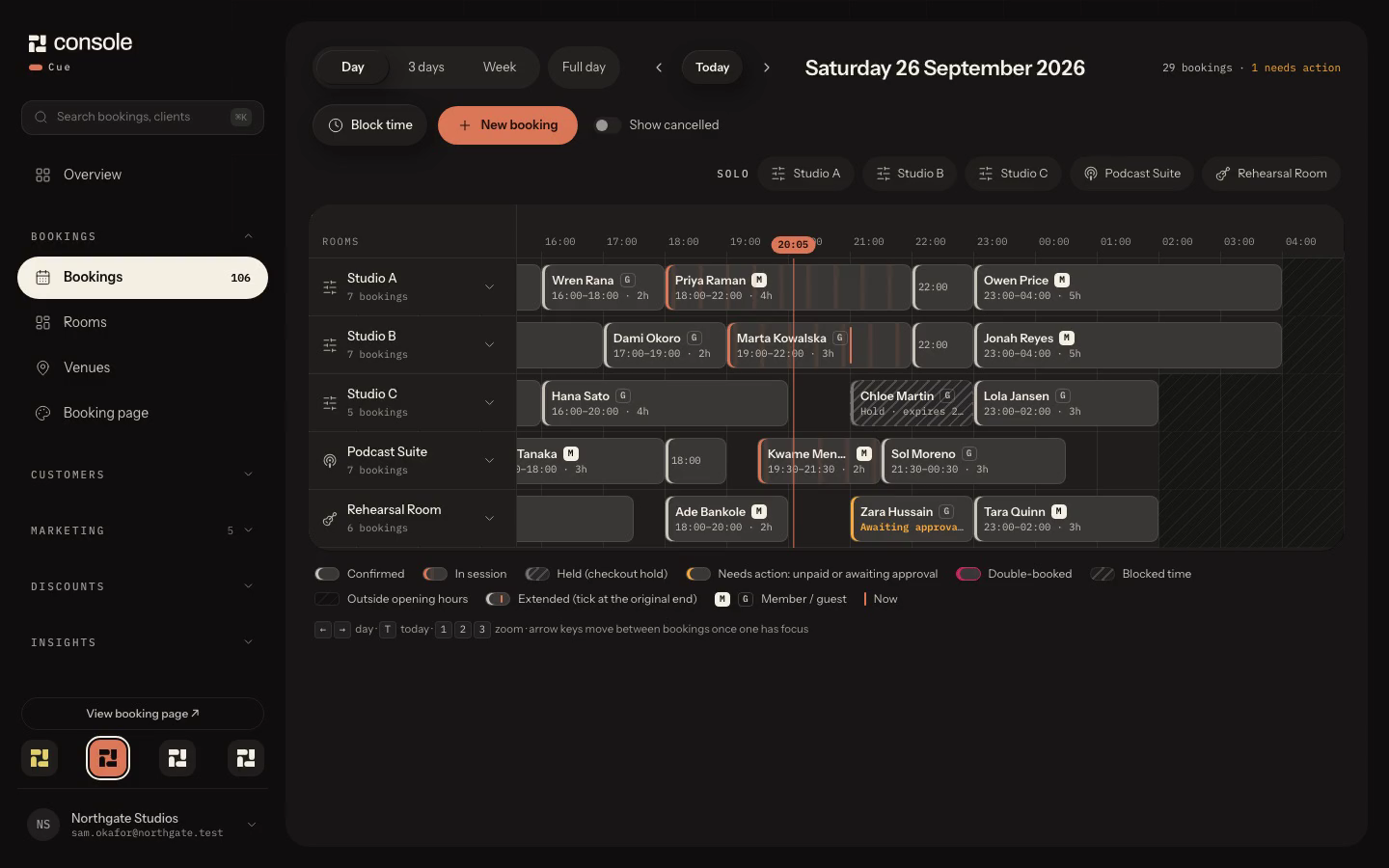
Saturday evening across five rooms, three sessions live, then three days and the week.

Sample workspaceSaturday evening across five rooms, three sessions live, then three days and the week.Cue

  1. Room and session bookings with deposits, holds that expire and no double bookings.
  2. Memberships that renew and retry failed cards without anyone chasing.
  3. WhatsApp and SMS conversations in one inbox, next to the booking they belong to.
  4. Email campaigns and a social composer that schedules your posts.
  5. Automations for follow-ups, session reminders and review requests.
  6. Smart locks open the room for the booking, so nobody has to be on site.

Integrations Sifely SwitchBot Google Meta Microsoft Xero Square

CH 02 Frame recordings to clips

One recording. Episode, captions and clips.

Frame automates the podcast and video edit, then generates social clips from the same recording, for your own shows or for client work.

Placeholder
Frame edit and clipsFrame
  1. Multicam cuts made automatically across every camera.
  2. Full episodes assembled and captioned from the session.
  3. Social clips generated from the same recording, for your shows or a client's.
  4. Finished clips load straight into Cue, ready to schedule and post.

CH 03 Send client delivery

Get paid before they get the files.

Send puts the finished work behind approval and payment, then hands it over the moment the invoice clears.

Placeholder
Send delivery pageSend
  1. Clients preview and approve the work.
  2. Files are released once the invoice is paid.
  3. Money goes to your own Square or Stripe account.

How it works one session, start to finish

Three channels.
One master.

  1. Step 1 CH 01 Cue

    Book it.

    A client picks Friday 14:00 in the Live Room, pays the deposit, and the door opens for them on the day.

  2. Step 2 CH 02 Frame

    Cut it.

    Frame cuts the multicam episode and the social clips from the recording, then loads the clips into Cue to schedule and post.

  3. Step 3 CH 03 Send

    Send it.

    The client approves, pays the balance, and Send releases the files.

Pricing monthly, in GBP

Pick the channels you run.

  • Starter

    £39/mo

    Cue on its own. Add the other channels when you need them.

    Cue
    Included
    Send
    +£19/mo
    Frame
    +£9/mo
    Send storage
    50 GB with Send
    Start free trial
  • Pro

    £129/mo

    The whole desk: bookings, clips and delivery.

    Cue
    Included
    Send
    Included
    Frame
    Included
    Send storage
    1 TB
    Start free trial

No card needed. By signing up you agree to our Terms and Privacy Policy.

  • Extra Send storage £5 per 100 GB
  • Billed monthly cancel any month

Case studies two rooms, one desk

Case study 01 podcast studio

Podyard

A podcast studio that runs the whole job from one desk.

podcast shoots booked each month
[stat]
episodes and clips delivered each month
[stat]

Figures to be confirmed by Podyard

Placeholder: Podyard studio photo

One job, start to finish

  1. CH 01 Cue

    The client books a podcast shoot online and pays the deposit.

  2. CH 01 Cue

    An automated email collects the brief, logos and assets before the session.

  3. CH 02 Frame

    The recording is cut into the episode, captions and social clips.

  4. CH 03 Send

    The client previews, approves and pays, then the files release.

  5. Master Console

    Every step is tracked in Cue, from booking to payment.

Case study 02 DJ and recording studio

Studio 808

A DJ and recording studio in Chelmsford, trading for more than 13 years, that largely runs itself.

Cue takes the bookings, renews the memberships, sends the marketing emails and offers DJ and production customers their next session. On the day, the room unlocks for the booking.

bookings taken
720
door codes issued automatically
1,514
automated emails sent
5,700
session extensions sold by WhatsApp upsell
51
late sessions run with nobody on site
84
contacts
530
members
14

Studio 808, 30 Mar to 3 Oct 2026

Placeholder: studio photo

FAQ nine answers

Before you sign up.

What problem does Cue solve?

A small studio runs on a dozen chores nobody is paid to do: taking bookings, chasing payments, sending the door code, answering “is Friday free” on WhatsApp at midnight, reminding a member their hours are about to lapse, posting on social, following up after a session. Cue does those chores. Customers book and pay on your page, the lock gets a code that works only for their slot, the reminder and the follow-up go out on their own, the upsell offer arrives when it is most likely to land, and your inbox, your bookings and your contacts are one screen. Studio 808 took 720 bookings and ran 84 late sessions with nobody on site in Cue’s first six months.

Why is Cue better for a production studio than a general CRM?

A general CRM knows about deals and emails. It does not know that Studio 2 closes at 02:00, that the 02:00 to 04:00 tail is members only, that an extension needs a new door code and a new price, or that a podcast shoot needs the client’s brief and logos before anyone turns up. Cue is built around rooms, hours, rates, members and locks, so the booking page, the pricing, the access control and the follow-ups all read from the same facts and never disagree. You configure your rooms once and everything else follows.

What is Cue’s unique selling point?

The whole studio runs from one desk, and it runs when you are not there. Booking page, payments through your own Square or Stripe, smart locks, WhatsApp and SMS, email campaigns, memberships, upsells, pipeline and insights are one product with one login, priced for a studio rather than an enterprise, and the same system you book with is the one that opens the door. It is run on Studio 808 every day before it ships to anyone else.

How does the free trial work?

Every new account starts on 14 days of Pro, with Cue, Frame and Send. No card is needed to start; choose a plan before the trial ends.

Can I cancel?

Yes. Plans are monthly with no annual contract, so cancelling stops the next month's charge.

Who owns my data?

You do. Your bookings, recordings and client files belong to your studio, not to Console.

How do payments work?

Clients pay you through your own Square or Stripe account, so the money lands with you. Console bills your subscription separately through Square.

Do the apps work on their own?

Cue does: Starter is Cue alone. Frame and Send add on to it, or come bundled in Studio and Pro.

Where is my data hosted?

In the UK and EU. Studio and client data is not stored outside those regions.
Run the sessionfrom one desk.

Start free trial

14 days of Pro no card